
In digital marketing, Search Engine Optimization (SEO), backlinks are often seen as golden tickets, signaling to search engines that your website is a valuable and authoritative resource.
However, not all backlinks are created equal. Just as a good backlink can propel your site to the top of search results, a harmful or “toxic” backlink can drag it down, leading to penalties from Google and a significant drop in organic traffic.
But don’t despair! If you suspect your website is suffering from a bad backlink profile, there’s a powerful tool at your disposal: the Google Disavow Tool.
This guide will walk you through the process of identifying and disavowing harmful backlinks quickly and easily, helping you protect your SEO efforts and maintain a healthy online presence.
What are Harmful Backlinks and Why Do They Matter?
Before we dive into the “how-to,” let’s clarify what constitutes a harmful backlink and why you should care. Harmful backlinks typically fall into a few categories:
- Spammy Backlinks: These often originate from low-quality, irrelevant websites, link farms, or automated bots. They are usually created in bulk, lack any genuine context, and are designed solely to manipulate search engine rankings.
- Paid Links: While some paid advertising is acceptable, paying for links that pass PageRank (the “authority” signal) in an attempt to manipulate search results is a violation of Google’s guidelines.
- Forum Spam/Comment Spam: Links left in forum signatures or blog comments that are irrelevant to the discussion and solely for self-promotion.
- Negative SEO Attacks: In some unfortunate cases, competitors might intentionally point harmful backlinks to your site in an attempt to sabotage your rankings.
Google’s algorithms are constantly evolving to detect and penalize websites that engage in or benefit from these manipulative link schemes. If your website is associated with a significant number of these toxic links, you could face:
- Manual Penalties: A direct notification from Google in your Search Console, indicating a penalty has been applied to your site.
- Algorithmic Penalties: A decline in rankings and organic traffic without a direct notification, often due to an algorithm update catching suspicious link patterns.
- Loss of Trust and Authority: Even if you don’t receive a formal penalty, a poor backlink profile can erode Google’s trust in your website, making it harder to rank for valuable keywords.
Step 1: Identify Your Backlinks (Using Tools like Semrush)
The first crucial step is to identify all the backlinks pointing to your website. While Google Search Console provides some backlink data, a dedicated SEO tool like Semrush offers a more comprehensive and actionable analysis.
Here’s how to use Semrush to identify your backlinks:
- Log in to your Semrush account and navigate to the “Backlink Analytics” tool.
- Enter your domain name into the search bar and click “Analyze.”
- Review the “Overview” report to get a general idea of your backlink profile, including the total number of backlinks, referring domains, and an “Authority Score” distribution.
- Go to the “Backlinks” tab to see a detailed list of all your backlinks. This is where you’ll begin your audit.
Image showing Semrush Backlink Analytics Overview Report.
- Focus on the “Referring Domains” tab as well. Sometimes, a single spammy domain can link to your site multiple times, and disavowing the entire domain is more efficient.
- Export the data: Semrush allows you to export your backlink data (typically in CSV format), which is essential for further analysis and for creating your disavow file.
Step 2: Analyze and Identify Toxic Backlinks
This is arguably the most critical step. You need to carefully review your backlinks and determine which ones are harmful. This often involves a combination of automated tools and manual inspection.
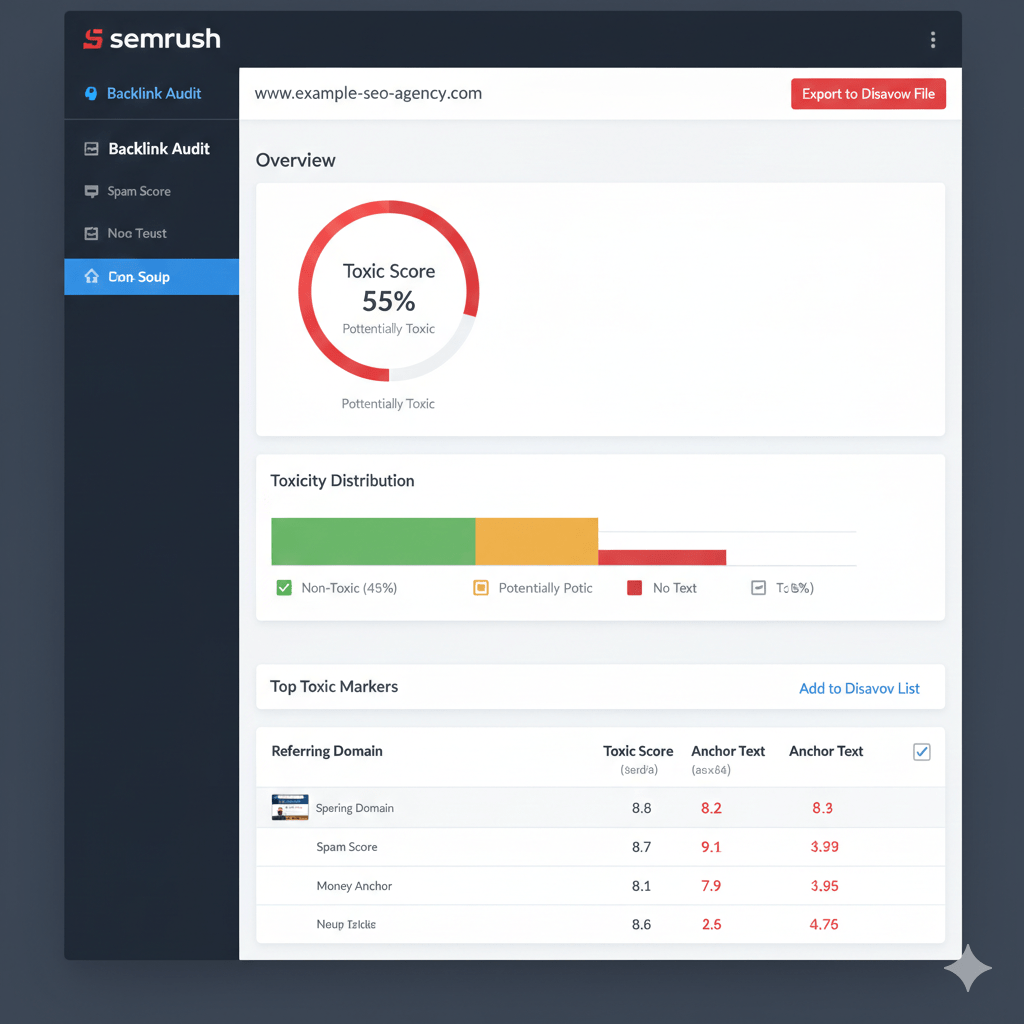
Semrush’s “Backlink Audit” tool is excellent for this:
- Navigate to the “Backlink Audit” tool within Semrush.
- Set up your audit: Semrush will guide you through connecting your Google Search Console and Google Analytics accounts for more accurate data.
- Review the “Toxic Score”: Semrush automatically assigns a “Toxic Score” to each backlink and domain, helping you prioritize your review. The higher the score, the more likely the link is harmful. See above Image showing Semrush Backlink Audit Overview with Toxic Score.
- Look for warning signs: As you review the links, pay attention to:
- Irrelevant content: Does the linking website have any relevance to your industry or niche?
- Low-quality design and content: Does the website look spammy, with poor grammar, excessive ads, or thin content?
- Suspicious anchor text: Is the anchor text overly optimized with exact match keywords that don’t flow naturally? Or is it gibberish?
- Foreign language sites: Unless you target those countries, links from unrelated foreign language sites can be suspicious.
- Large numbers of outbound links: Websites that link out to hundreds or thousands of other sites, especially if they are low quality, are often link farms.
- Hidden links: Links that are cloaked or hidden within the page.
- Manual Verification (Crucial!): While tools are helpful, always manually check a selection of flagged links. Visit the linking page and assess its quality. Sometimes, a high “Toxic Score” might be a false positive, and other times, a seemingly innocent link might reveal itself to be spam upon closer inspection.
- Add to Disavow List: In Semrush, you can add individual URLs or entire domains to your “Disavow List” directly from the audit report. This makes building your disavow file much easier.
Step 3: Attempt to Remove Backlinks (Optional but Recommended)
Before resorting to the Disavow Tool, Google encourages you to attempt to have the harmful backlinks removed directly. This shows Google that you are actively trying to clean up your link profile.
- Contact the website owner: Find the contact information (email address, contact form) for the website owner and politely request the removal of the link.
- Keep records: Document your attempts to contact website owners, including dates, methods, and responses (or lack thereof). This evidence can be useful if you ever need to communicate with Google about a manual penalty.
While direct removal is ideal, it’s often difficult to achieve, especially with truly spammy sites. Don’t spend too much time on this step if you’re not getting responses.
Step 4: Create Your Disavow File
Once you’ve identified all the backlinks you want to disavow, you need to compile them into a plain text (.txt) file.
Formatting your disavow file is critical:
- To disavow a specific URL: Enter each URL on a new line.
http://spam-site.com/spammy-page.htmlhttp://another-spam-site.com/another-spam-page.html - To disavow an entire domain: Add “domain:” before the domain name. This is often the most efficient approach if a whole website is spammy.
domain:spam-site.comdomain:another-spam-site.com - Comments: You can add comments to your file by starting the line with a “#”. This is helpful for your own records but Google ignores them.
# This is a commentdomain:bad-spam-site.com # Disavowing this domain due to link farm activity
Example Disavow File:
# Disavow file created on 2023-10-27
# Links identified as spammy by Semrush Backlink Audit

domain:spammysite123.com
domain:badlinkfarm.net
http://lowqualityblog.org/spammy-post-about-viagra.html
http://irrelevantforum.com/thread-12345.html
domain:blackhatseo.ru
Using Semrush to Generate the File: If you used Semrush’s Backlink Audit, you can simply click “Export to Disavow File” from the “Disavow” tab, and Semrush will generate a correctly formatted .txt file for you.
Step 5: Submit Your Disavow File to Google

Now it’s time to tell Google which links you want them to ignore.
- Go to the Google Disavow Tool: You can find it by searching for “Google Disavow Tool” or by directly visiting:
https://search.google.com/search-console/disavow-links. See above image. - Select your property: Make sure you select the correct website property for which you are submitting the disavow file.
- Click “Upload disavow file” and choose the .txt file you created.
- Confirm and Submit: Google will process your file. You should receive a confirmation message.
What Happens Next?
- Patience is Key: It can take several weeks, or even months, for Google to fully process your disavow file and adjust your site’s ranking accordingly. Don’t expect immediate results.
- Monitor Your Rankings and Traffic: Keep a close eye on your Google Search Console performance reports and Google Analytics. Look for signs of recovery in your organic traffic and keyword rankings.
- Check for Manual Penalties: If you had a manual penalty, Google will review your disavow file (and your attempts at manual removal) and may revoke the penalty.
- Ongoing Maintenance: Your backlink profile is not static. New links are created all the time. It’s a good practice to periodically review your backlinks (e.g., quarterly or semi-annually) and update your disavow file as needed.
Important Considerations and Warnings
- Use with Caution: The Disavow Tool is a powerful weapon, but it should be used with extreme caution. Disavowing good backlinks can harm your SEO, so always be sure you are disavowing truly harmful links. When in doubt, it’s often better to err on the side of caution.
- Not a Ranking Booster: The Disavow Tool is primarily a defensive measure. It helps remove negative signals, but it won’t directly boost your rankings. For that, you need to focus on building high-quality content and earning natural, authoritative backlinks.
- Focus on Domains: Whenever possible, disavow entire domains rather than individual URLs, especially if the whole site is clearly spammy. This is more effective in preventing future issues from that domain.
- Don’t Over-Disavow: There’s no need to disavow every single low-quality link. Google is smart enough to ignore many of them automatically. Focus on the ones that are truly egregious or appear in large numbers.
By following these steps, you can effectively use the Google Disavow Tool to clean up your backlink profile, protect your website from penalties, and ensure your SEO efforts are not undermined by harmful links. Remember, a healthy backlink profile is a cornerstone of long-term SEO success.
 Top SEO Ph
Leave a comment